The journal
A trading journal you will actually keep
Logging is the part everyone quits. So Traquil makes it the fast part: a slide-over form that remembers how you trade, a screenshot that drafts the trade for you, and a recap that takes a minute.
Free plan, plus 14 days of Pro with no card.
On the Free plan.
What it does
Log a trade in seconds
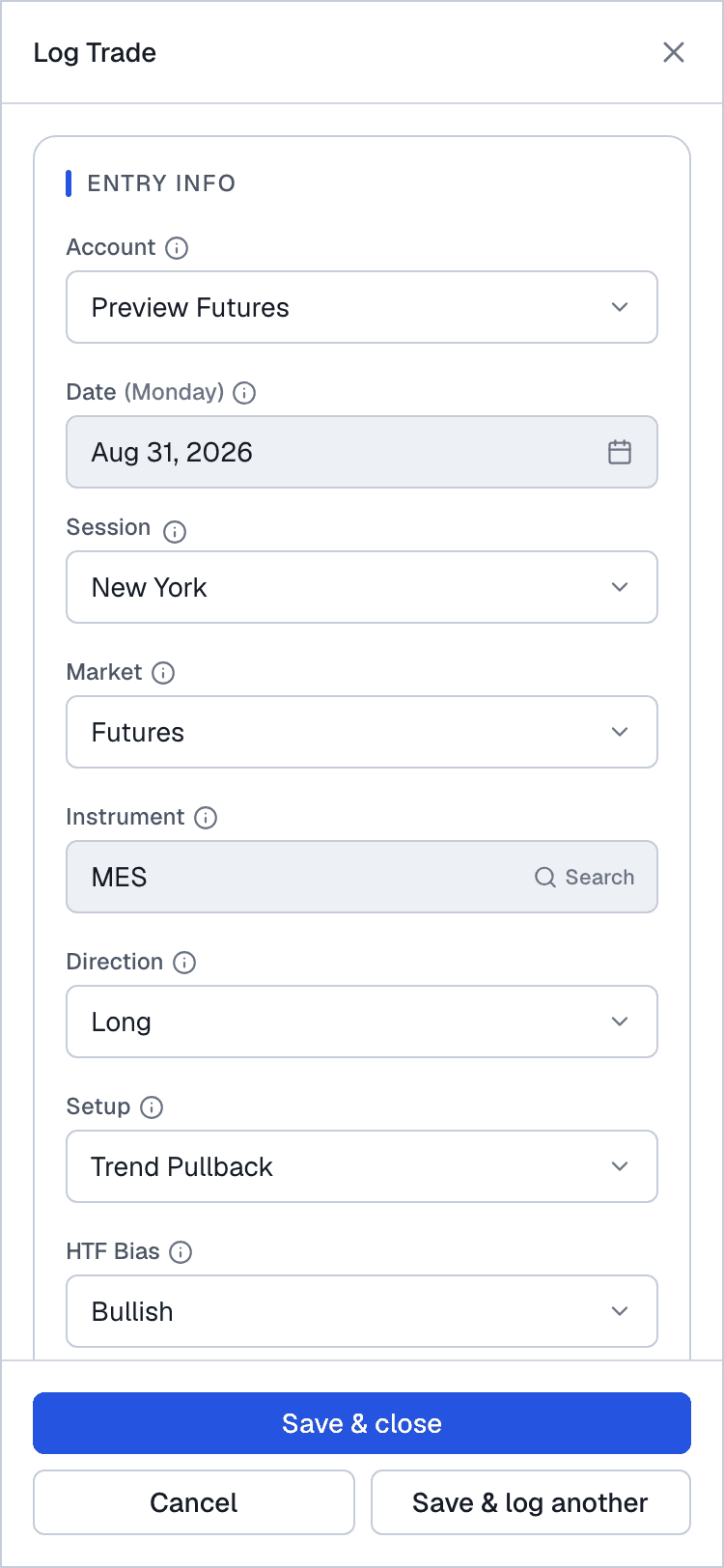
Instrument, direction, entry, exit and quantity are enough to save a trade. Traquil works out the P&L net of commission from the contract's point value, and after your first trade it pre-fills what you usually pick: instrument, market, session and setup.
Or let a screenshot draft it
Drop in a screenshot of your broker's trades and Traquil reads it into a drafted trade for you to check before saving. Nothing is saved until you press save. Free accounts get 10 screenshot reads a month, with AI features turned on.
Your psychology, never pre-filled
Confidence, focus, emotion, whether you followed your plan and the mistake you made are your honest answers, so the form never guesses them for you. Those fields are what the Psychology and Mistakes pages read.
Session Prep before you trade
The forward half of the journal: your intention for the session, your mindset, the levels you care about and your checklist, written before the first trade rather than reconstructed after it.
This week's news calendar
The week's economic releases, with the ones that move your markets marked, so a high-impact number at 14:30 is something you planned around rather than something that happened to you.
Recaps and reviews that carry forward
A short daily recap, then weekly and monthly reviews that compare what you planned with what happened. Last period's focus is quoted back at the top of the next one, so the thing you said you would fix does not quietly disappear.
How it works
- Step 1
Prep
Write a line about the session and run your checklist.
- Step 2
Log
Press Log trade, or drop in a screenshot, and save in seconds.
- Step 3
Tag
Add the emotion, the setup and any mistake while it is fresh.
- Step 4
Review
Write the day's recap, and pick one thing to change each week.
What it will not do
Said plainly, because a journal that overstates itself is the wrong tool for seeing clearly.
- It never places, modifies or cancels an order. Traquil is read-only by design.
- It does not pull live market data from your broker. Charts in the app render from TradingView.
Questions
How long does it take to log a trade?
Instrument, direction, entry, exit and quantity are enough, and after your first trade the form remembers your usual instrument, session and setup, so most trades take a few seconds. A screenshot of your broker's fills can draft the trade for you instead.
Does it work on my phone?
Yes. Traquil runs in any browser, and on a phone you can add it to your home screen, where it opens full screen with a bottom tab bar like an app.
Which languages is the app in?
English, Swedish, German, Spanish, French and Portuguese. Pick one in Settings and it follows you to every device.
Is there help inside the app?
Yes. A Help section with short guides and silent screen recordings, a one-line intro the first time you open each page, and a five-step setup guide you can turn on in Settings.
Keep exploring
- How to journal a tradeWhat to write, and when, so the journal can tell you something.
- Import and exportCSV import of trades or fills, screenshot autofill, and export on every plan.
- Psychology and Quil ScoreThe calibration curve, emotions against results, and a score for how real your edge is.
- Mistakes TrackerYour biggest leak, what each mistake costs, and whether it is getting rarer.
See your own trading clearly
Open the demo to see every page on sample data, or start your own journal. The Free plan is yours to keep.
Free plan, plus 14 days of Pro with no card.